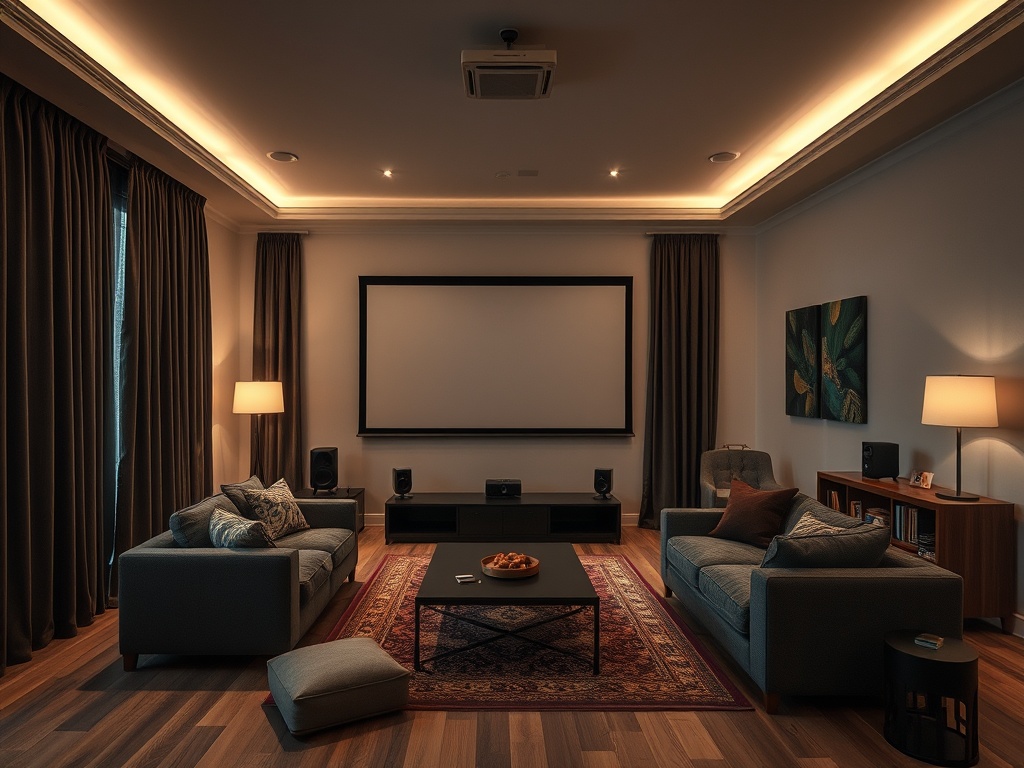
Renters can make a home entertainment setup feel dramatically better with reversible blackout, seating, and acoustic changes. The goal is not to build a permanent theater; it is to control light, comfort, reflections, and speaker placement without risking the lease.
Rental-friendly priority order: block uncontrolled light, place seating at a sensible distance, reduce hard-surface reflections, and improve speaker clarity before buying more gear.
Start with light control because it changes everything
A screen can only look as good as the room allows. Daylight, streetlights, glossy surfaces, and bright lamps reduce perceived contrast. Renters should start with reversible solutions: tension rods with blackout curtains, removable window film where allowed, lined drapes, darker throw blankets over reflective furniture during viewing, and low-glare lamps placed behind or beside the seating rather than near the screen.
For professional context, the Illuminating Engineering Society represents formal lighting expertise, and CEDIA’s immersive audio recommended practice shows why room layout, listener position, and speaker design should be treated as one system.
The Illuminating Engineering Society is a professional authority on lighting, and its broader focus on the lighted environment is a reminder that brightness is not the only variable. Direction, contrast, glare, and surface reflection also affect comfort. For a renter, this means a cheap lamp in the wrong place can hurt movie night more than a modest screen helps it.
Avoid permanent adhesive, paint, drilling, or window treatments unless the lease allows them. If blackout curtains are too heavy for a tension rod, use freestanding curtain stands or lightweight layered fabric. The best rental tweak is one you can remove cleanly on moving day.
| Tweak | Rental-safe version | Watch out for |
|---|---|---|
| Blackout | Tension rod curtains, removable film, lined fabric panels, or freestanding curtain stands. | Adhesives that peel paint, blocked ventilation, or unsafe window coverage. |
| Seating | Move the sofa to reduce neck strain and create a centered listening position. | Pushing seats against a back wall where bass can become boomy. |
| Acoustics | Rugs, bookcases, curtains, fabric panels, and soft furniture. | Foam squares placed randomly without solving actual reflections. |
| Speakers | Ear-height placement, stable stands, careful subwoofer position, and basic calibration. | Buying louder speakers before fixing room layout. |
Seating should serve sightline and sound
People often arrange a room for furniture symmetry rather than viewing comfort. For film and games, the main seat should face the screen without twisting the neck. It should also sit far enough back for the image to feel immersive but not so far that details disappear. The exact distance depends on screen size and personal comfort, but the principle is stable: choose the primary seat first, then adjust the room around it.
Sound also changes with seat location. Sitting directly against a wall can exaggerate bass and flatten surround effects. Moving the sofa even a short distance forward may improve clarity. If the sofa cannot move, add a thick textile behind it, adjust speaker angle, and avoid placing a subwoofer in a corner without testing other positions.
CEDIA’s immersive audio recommended practice is a professional-level document, but renters can borrow a simple idea from it: the room, speakers, and listeners form one system. Better sound is not only a hardware purchase. It is placement, reflection control, and calibration working together.
Acoustic tweaks should reduce harsh reflections
Most rental rooms have hard floors, bare walls, windows, and flat ceilings. Those surfaces reflect sound, making dialogue less clear and bass less controlled. The renter-friendly answer is not to cover every wall with foam. Start with large, useful soft surfaces: a rug between speakers and seating, curtains over glass, bookshelves with uneven depth, fabric wall hangings where allowed, and cushions or upholstered furniture in reflection-heavy areas.

A simple clap test can help. Clap once in the room and listen for a sharp flutter or ringing decay. Then add a rug, close the curtains, or move a bookshelf and try again. This is not laboratory measurement, but it trains your ear to notice the room rather than blaming every problem on the TV or speaker brand.
Spend money where the room proves a need
A renter on a budget should avoid buying upgrades in the wrong order. If the room is bright, blackout helps before a more expensive projector. If dialogue is muddy, placement and soft surfaces may help before a new soundbar. If the seating is uncomfortable, no calibration will make a three-hour film feel good. Let the room reveal the problem before assuming gear is the answer.
This approach resembles other creator-economy planning: separate the result you want from the tool you are tempted to buy. For independent creators, legal and accounting basics prevent business clutter; for home entertainment, room basics prevent gear clutter. In both cases, the least glamorous fix often delivers the clearest improvement.
Renters who love film culture can also connect the room to viewing habits. A better setup may support a more intentional thematic watchlist or reading list around one cultural question because the room becomes inviting enough for focused viewing rather than distracted background playback.
A weekend improvement plan
On Friday, map the problems: light leaks, neck strain, muddy dialogue, echo, weak bass, or cluttered cable paths. On Saturday, move furniture, test curtain options, add rugs or textiles, and adjust speaker angles. On Sunday, watch one familiar scene and one dialogue-heavy scene, then write down what changed. Keep changes that improve comfort and clarity. Return anything that only looked impressive in the package.
The best rental home-theater upgrade is reversible, noticeable, and based on the room you actually have. Blackout, seating, and acoustic fixes may not look as exciting as new electronics, but they often make the electronics you already own perform closer to their potential.
A room test before buying anything
Choose one familiar movie scene with dark images, one dialogue-heavy scene, and one music or action scene. Watch all three before making changes, then repeat them after each adjustment. This prevents placebo upgrades. If a curtain, rug, or seating move does not improve a known scene, rethink it before spending money.
Take quick notes from the main seat and one secondary seat. Renters often share spaces, so the best setup may not be perfect for one chair if it makes the whole room awkward. The winning tweak improves the viewing habit, not just the technical diagram.
Cable safety and neighbor comfort also belong in the plan. Tape or route cables so nobody trips, keep subwoofers away from shared walls when possible, and test late-night volume from the hallway. A better room should not create a new lease or neighbor problem.